bug bountyethical hacking trainingpenetration testingweb application securityvulnerability assessment
Beginner Guide to Bug Bounty: Find Your First Vulnerability in 7 Days
Security Research Team··8 min read
72% Find Their First Bug Within 14 Days
Across our training cohorts, the data tells a consistent story: 72% of students who follow a structured methodology submit their first valid bug bounty report within two weeks. Not because they had prior experience. Most did not. Not because they used expensive tooling. They used free, open tools. The difference was approach: a focused sprint with clear daily objectives instead of aimless poking.
The remaining 28% were not far behind. They typically needed one more week and a different target.
This guide distills that methodology into seven days. The same framework, the same sequence, the same results.
Before You Start: A Quick Gut Check
You do not need a CS degree, years of coding, expensive certifications, or any Hollywood notion of "hacking."
You do need basic comfort with a browser, willingness to read docs, patience, and an ethical compass that does not bend.
The 7-Day Map
Seven days. Five phases. One objective: submit a valid report.
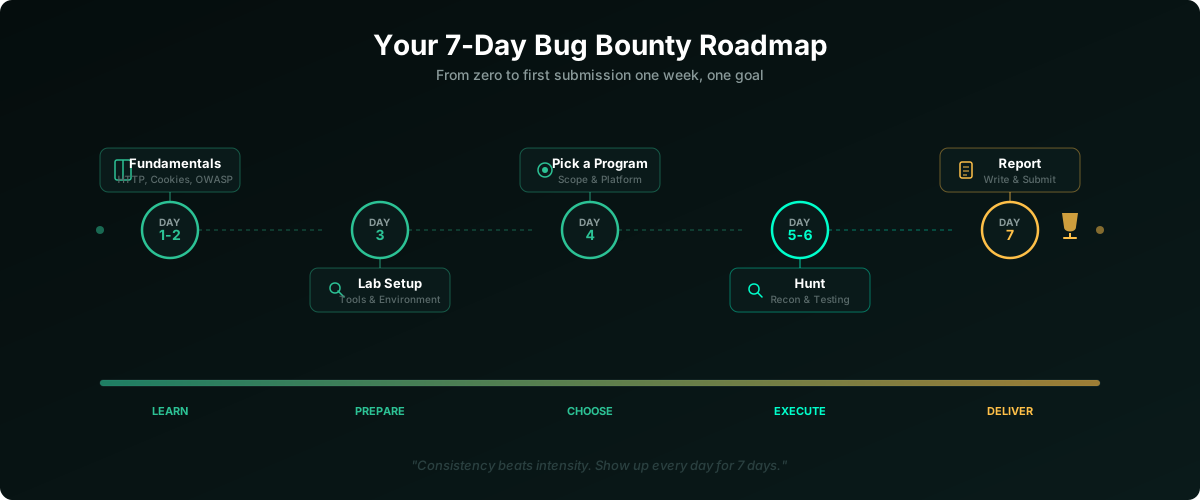
Each day builds on the last. Resist the urge to skip ahead.
Days 1 and 2: Build a Minimum Viable Knowledge Base
You are not trying to become an expert in 48 hours. You are building just enough context to understand what you will be looking at when you start testing live targets.
HTTP Fundamentals
Every web application speaks HTTP. Your browser sends a request (method + URL + headers + body) and the server returns a response (status code + headers + body).
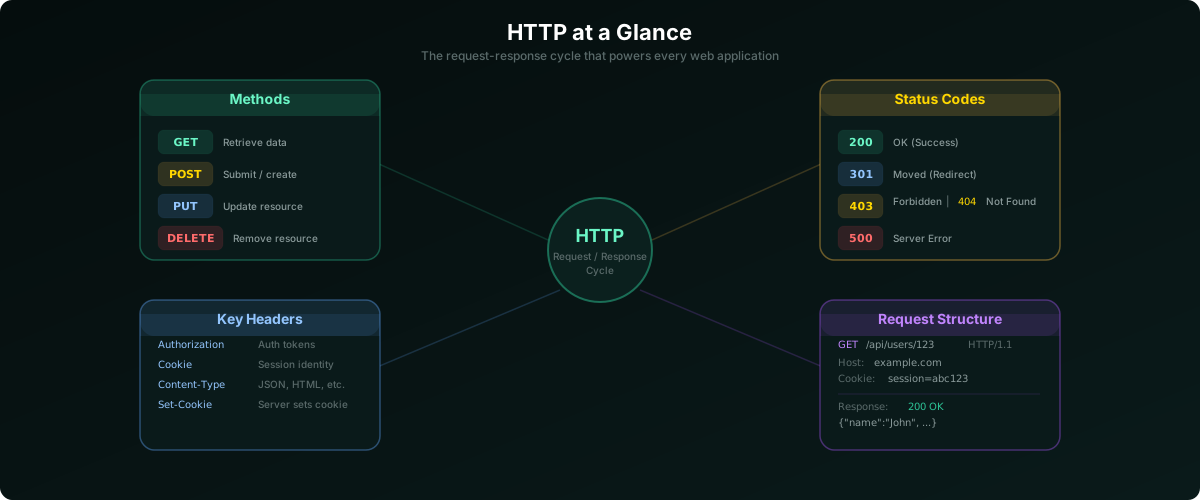
The core methods: GET retrieves data, POST submits it, PUT updates, DELETE removes. Status codes: 200 success, 301 redirect, 403 forbidden, 404 not found, 500 server error. Headers carry authentication tokens, content types, and caching rules. This request-response cycle is the alphabet of web security.
Cookies and Sessions
When you log in, the server creates a session and hands your browser a session token (usually a cookie) attached to every subsequent request. That cookie is your identity on the wire. If someone steals it, they become you. If the application fails to validate it properly, you can sometimes escalate access just by modifying it.
The Top 10 Web Vulnerability Categories
The industry standard, OWASP Top 10 (2025 edition), classifies the most critical web risks into ten categories: broken access control, security misconfiguration, software supply chain failures, cryptographic failures, injection (SQL, command, etc.), insecure design, authentication failures, software or data integrity failures, security logging and alerting failures, and mishandling of exceptional conditions. You do not need to master all ten now. Just understand what each category means so you recognize issues when you encounter them.
Action: Spend 2 to 3 hours each day. Open DevTools (F12), browse your favorite sites, and watch the Network tab. That same traffic is what you will analyze when hunting.
Day 3: Tools and a Practice Target
No more theory. Today you set up your toolkit and break something on purpose, safely.
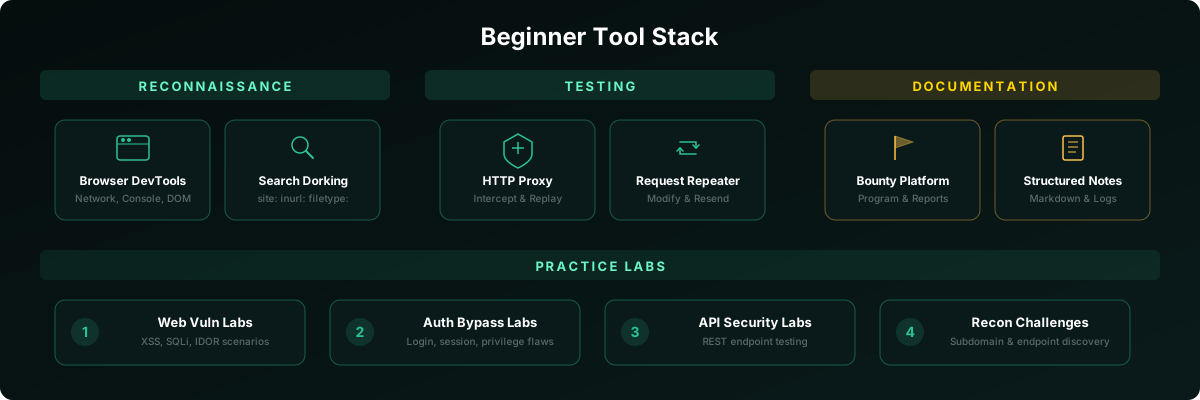
Browser DevTools. The most underrated security tool, and you already have it. The Network tab shows every request/response including headers and cookies. The Console surfaces JavaScript errors. The Elements panel exposes hidden form fields and commented-out HTML.
HTTP Interception Proxy. Sits between your browser and the server, letting you inspect, modify, and replay requests in real time. Set up a free proxy tool, then learn three things today: intercept a request, send it to a repeater, modify a parameter and resend it. This ability to surgically alter requests is what turns a browser user into a security tester.
Structured Notes. Document every endpoint, every odd parameter, every unexpected response from the start. A markdown editor or plain text file organized by target works fine. Your notes become your hunting map later.
Practice Labs Before touching a live target, practice on intentionally vulnerable applications. The OWASP Foundation maintains several open-source projects designed for exactly this purpose. In addition, our platform provides guided labs that simulate real-world web vulnerabilities in an isolated, legal environment, giving you the flexibility to apply everything you learn in a safe space. Build muscle memory with your proxy tool without any legal risk. Spend 2 to 3 hours today intercepting a login request and studying its parameters.
Day 4: Pick One Program
Most beginners make the same mistake here: they choose the biggest, most famous bounty program and then wonder why every surface has already been scraped clean. Do not be that person.
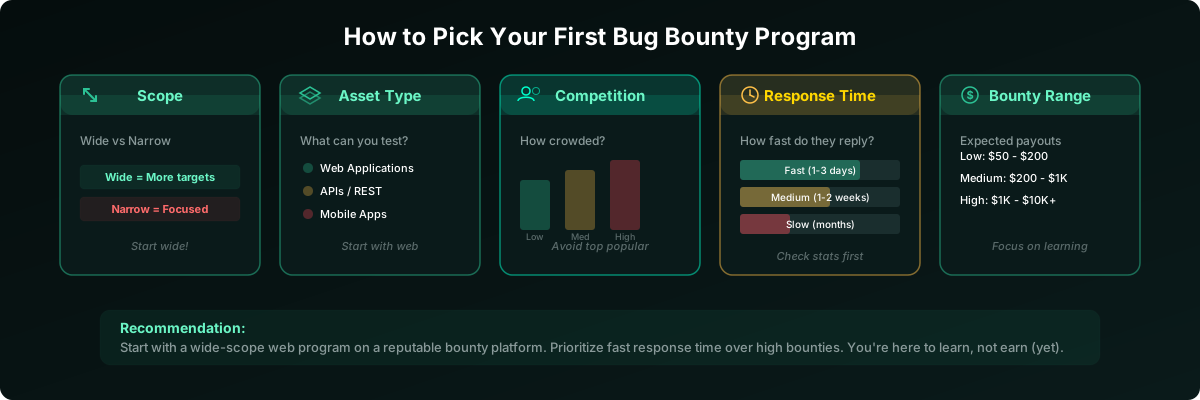
Create accounts on established bug bounty platforms. Browse their program directories. Sort by "newest" or "recently updated." Fresh programs have less competition.
What to prioritize:
- Wide scope: Programs covering all subdomains (
*.example.com) give you far more ground to explore. - Web applications: Mobile and hardware demand specialized tooling. Web is the fastest path to a first finding.
- Fast response times: If average triage takes 90+ days, try a different program. Aim for two-week response windows.
- VDPs over paid programs: Vulnerability Disclosure Programs attract less competition and are more forgiving of rough reports. Your goal is a valid finding, not a payday.
Day 4 checklist: Create your platform accounts. Browse 10 to 15 programs. Read the full scope and policy of your top three picks. Choose one. Read its policy page. Twice.
Days 5 and 6: Recon and Hunting
Two focused days. Not random clicking, just systematic work.
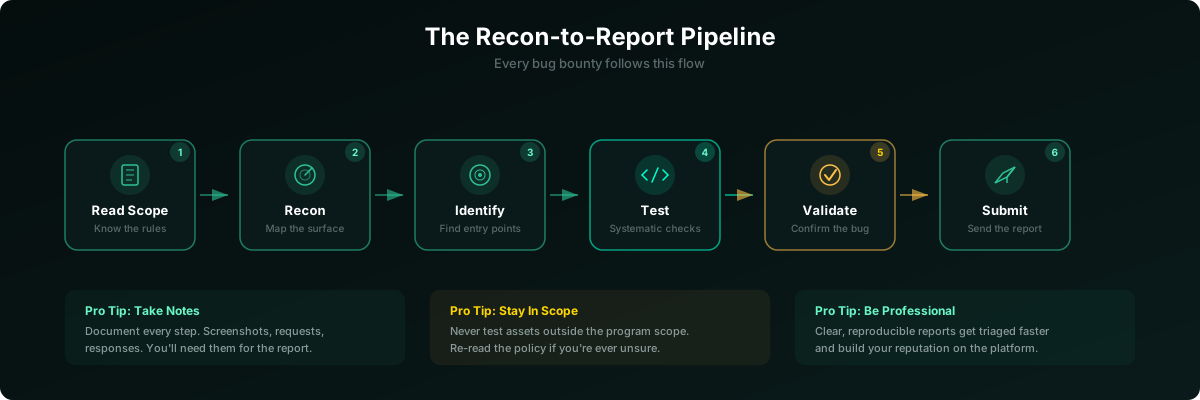
Phase 1: Scope Review (30 min)
Re-read the program policy. Write down every in-scope domain, every out-of-scope exclusion, the vulnerability types they care about, and any special rules (no automated scanning, rate limits, etc.).
Phase 2: Reconnaissance (2 to 3 hours)
Map the attack surface. Browse the entire application as a normal user: every link, every form, every feature. Watch your proxy history for API endpoints, hidden parameters, and odd responses. Check robots.txt and sitemap.xml. Read JavaScript source files for hardcoded API paths. Use search engine dorking (site:target.com) to discover indexed pages the navigation does not expose.
Phase 3: Test (4 to 6 hours)
For every endpoint and feature you found, ask yourself:
Access control: If I swap this ID, do I see someone else's data? (IDOR.) If I strip my auth token, does the request still succeed? (Broken authentication.) Can a regular user access admin-level endpoints? (Privilege escalation.)
Input handling: Does this redirect parameter accept external URLs? (Open redirect.) Do error messages reveal internal paths or stack traces? (Information disclosure.) Are there debug panels or exposed configuration files still active in production? (Misconfiguration.)
If you want to sharpen these techniques before applying them on a live target, our labs offer scenario-based exercises covering each of these categories in a controlled environment.
Phase 4: Validate
Before you get excited: reproduce the behavior three times. Confirm it affects another user or exposes sensitive data. Verify the asset and vuln type are in scope. Search previously disclosed reports for similar findings.
Day 7: Write the Report
A solid report is the difference between "Triaged" and "Informative: Closing." Even a genuine bug gets dismissed if the triager cannot reproduce it from your write-up.
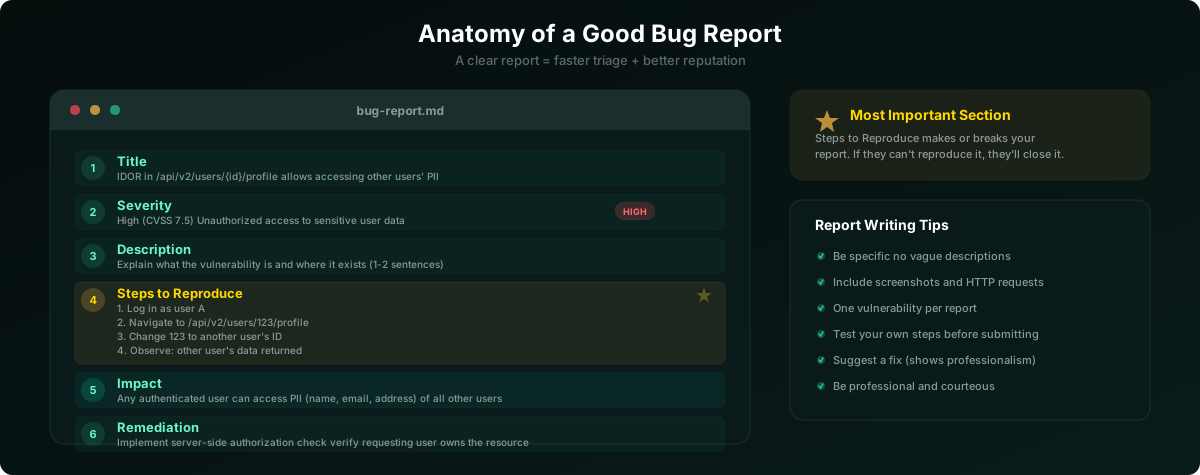
Six Sections That Matter
Title. Not "XSS found" but "Stored XSS in profile bio via unsanitized markdown." The triager should know the what and where from the title alone.
Severity. Use the platform's scale or CVSS. Be honest. Inflating severity destroys credibility fast.
Description. One or two paragraphs: what the vulnerability is, where it lives, why it exists.
Steps to Reproduce. The most important section. Numbered steps, exact URLs, raw HTTP request/response pairs from your proxy, screenshots at each step. Assume the reader has never touched the app.
Impact. Concrete. "An attacker could retrieve any user's billing address by modifying the userId parameter in /api/v2/profile."
Remediation. Even a one-liner helps: "Implement server-side authorization checks on this endpoint."
The 5 Bugs Beginners Actually Find
Focus here first. These are common, discoverable without advanced tools, and well-rewarded.
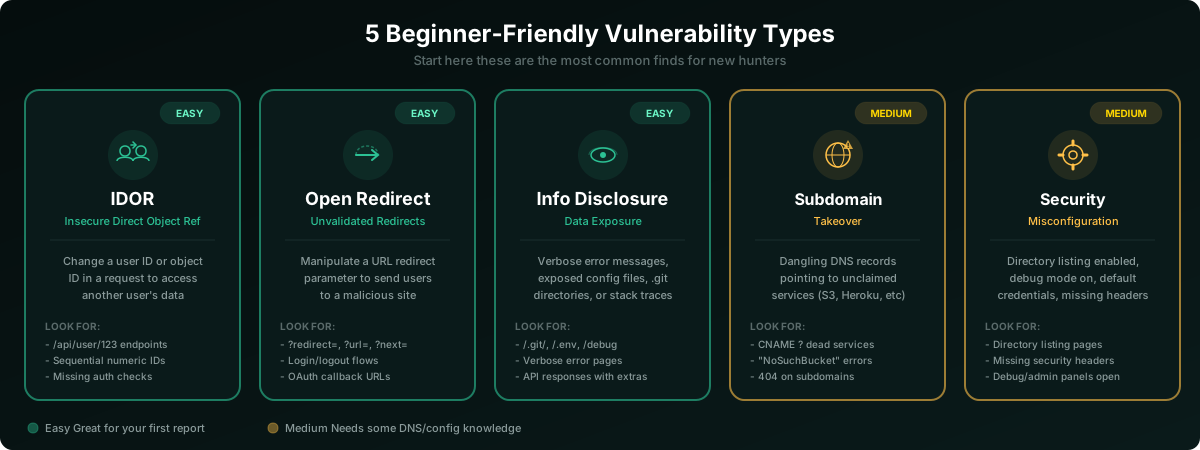
IDOR (Insecure Direct Object Reference). Swap a numeric ID in any request that references user data. If you see another user's records, that is an access control failure: the server failed to verify authorization for the specific resource. The most common first bug for new hunters.
Open Redirect. Parameters like ?redirect=, ?url=, or ?next= control where the app sends you after an action. Point them at an external domain. If the app follows without validating the destination, report it.
Information Disclosure. Verbose error pages revealing stack traces, exposed .git directories, .env files, or API responses returning more data than the UI displays. Often hiding in plain sight.
Subdomain Takeover. A company removes a service but leaves the DNS CNAME pointing at the old provider. Anyone can claim that subdomain. Requires DNS knowledge but pays well.
Security Misconfiguration. Directory listings, admin panels with default credentials, missing security headers like Content-Security-Policy. Configuration errors, not code bugs, and they are everywhere.
Pre-Submit Checklist
Run through this before every single report.
- I have explicit authorization to test this target
- The vulnerability is within scope (domain AND type)
- I can reproduce it at least 3 times
- My title is specific: what and where
- I included numbered steps to reproduce
- I attached evidence (screenshots, HTTP requests)
- Severity is honest, not inflated
- Impact is concrete and realistic
- I included a remediation suggestion
- I re-read the program policy one final time
- I searched for similar disclosed reports
- My report contains no working exploit code
- I have not disclosed this to anyone else
After Day 7
Many beginners land a valid finding within this window, especially IDORs and info disclosures on wide-scope programs. But if Day 7 passes without a submission, that is normal, not failure.
What to do next: Revisit your recon notes for missed endpoints. Try a different program. Go deep on one vulnerability type instead of testing for everything.
Ethics Are Not Optional
Never test outside of scope. Never access real user data; demonstrate with your own test accounts. Never threaten a company. Never publish before the fix lands. The ecosystem runs on trust. Be the researcher companies want to hear from.
End of Article
Continue Reading
 8 min read
ssrfweb application security+3
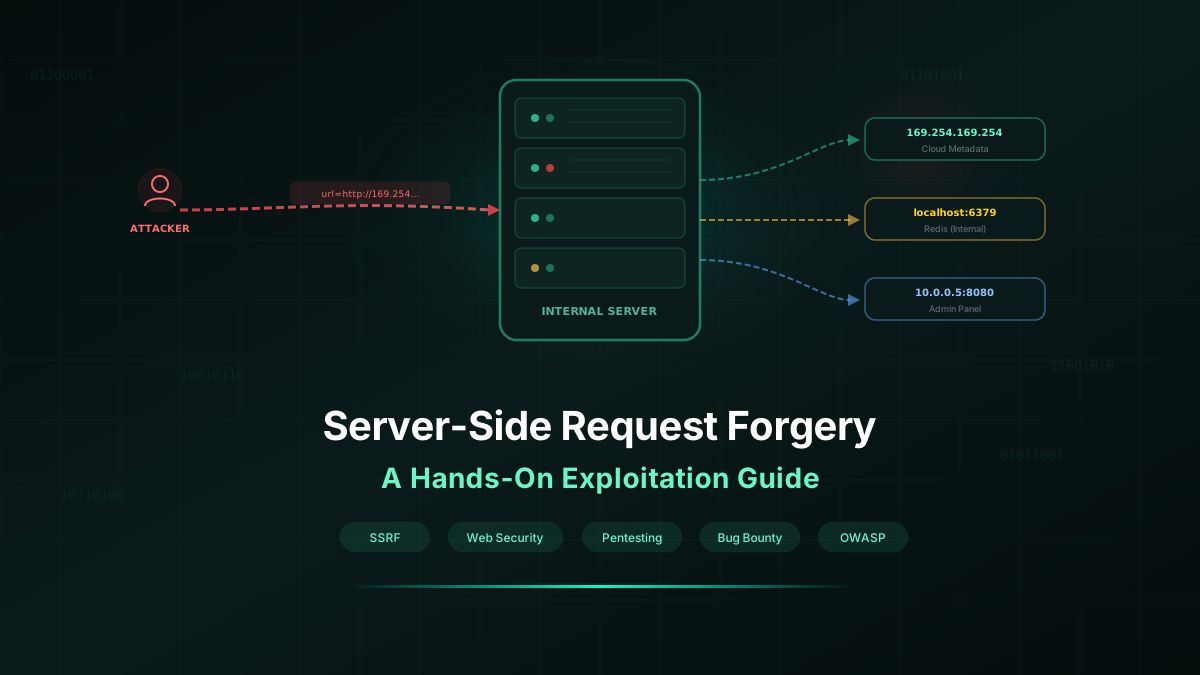
Server-Side Request Forgery (SSRF): A Hands-On Exploitation Guide
A practical, step-by-step walkthrough of SSRF — from finding vulnerable endpoints to exploiting cloud metadata, bypassing filters, and chaining SSRF to full compromise.
Security Research Team·2026-03-07
 5 min read
broken authenticationpenetration testing+3
How Attackers Bypass Login Pages (Real Examples)
The 8 most common techniques attackers use to bypass authentication, with defensive patterns that actually work.
Security Research Team·2026-02-05
 8 min read
artificial intelligencepenetration testing+3
Can AI Replace Penetration Testers? A Reality Check
Separating hype from reality. What AI can and cannot do in penetration testing, and why the human pentester is not going anywhere.
Security Research Team·2026-03-03