broken authenticationpenetration testingweb application securityOWASP Top 10session management
How Attackers Bypass Login Pages (Real Examples)
Security Research Team··5 min read
The Login Page That Wasn't
Last year, during a routine pentest for a mid-sized SaaS company, we hit their login page expecting the usual grind. Credential testing, rate-limit probing, all the usual checks.
We were in within four minutes.
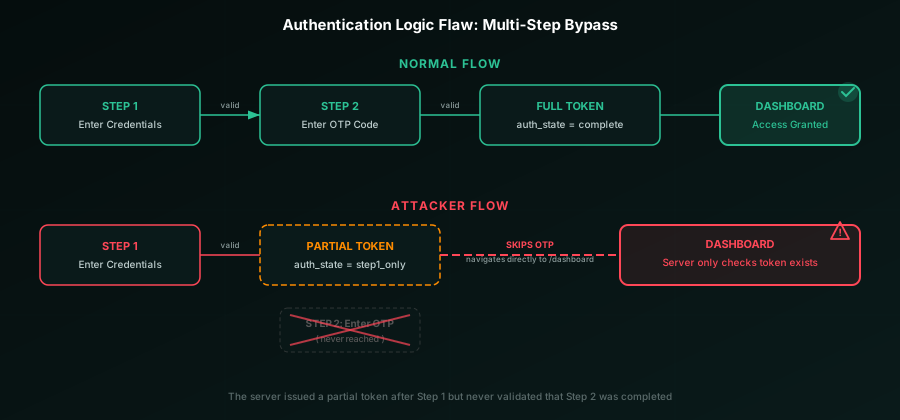
Not some exotic zero-day. The app had a multi-step login flow where the second step (an OTP check) could be skipped entirely by navigating straight to the post-auth dashboard URL. The session was already partially established after step one. Nobody had ever tested whether step two was actually enforced.
That's the thing about authentication bypasses. They're rarely clever. They're usually the result of an assumption nobody questioned.
Here are the eight patterns we see most often, and the defenses that shut each one down.
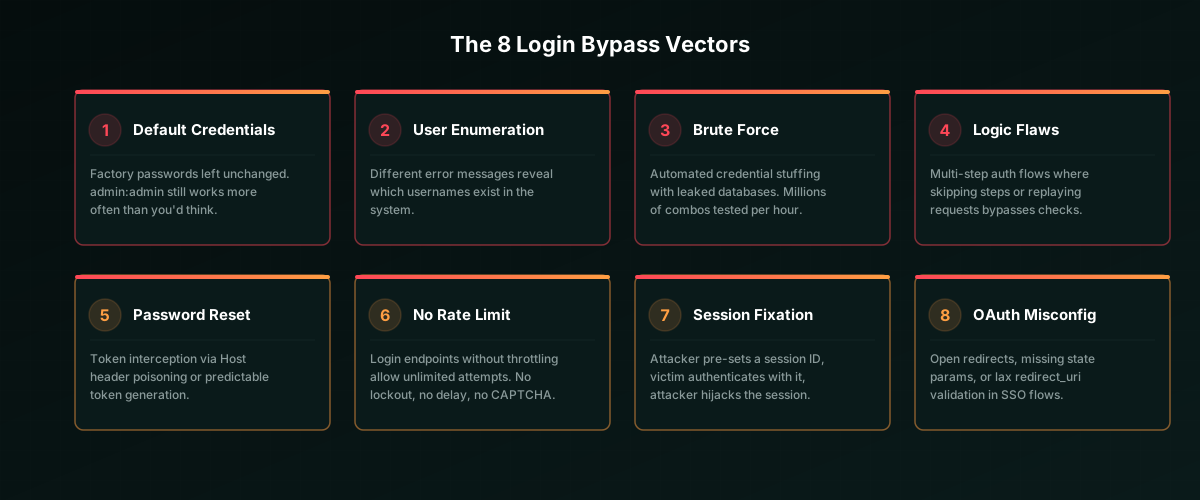
1. Default and Weak Credentials
This one shouldn't still be on the list. And yet.
Admin panels with admin:admin. Network appliances with admin:password. Database instances with no password at all. We find these on nearly every external pentest, usually on forgotten subdomains or internal tools exposed through misconfigured firewalls.
The problem isn't that developers don't know better. It's that default credentials survive deployment. Staging configs leak to production. Vendor appliances ship pre-configured and nobody rotates.
Defense: Force credential changes on first login. Scan for defaults in CI/CD. Maintain an inventory of every service that accepts authentication. For a comprehensive list of known defaults, check SecLists Default Credentials.
2. User Enumeration via Error Messages
This one seems harmless until you realize what it enables.
When your login form returns "Incorrect password" for valid usernames but "User not found" for invalid ones, you've handed the attacker a user-discovery oracle. They don't need to guess passwords yet. First, they'll build a confirmed username list.
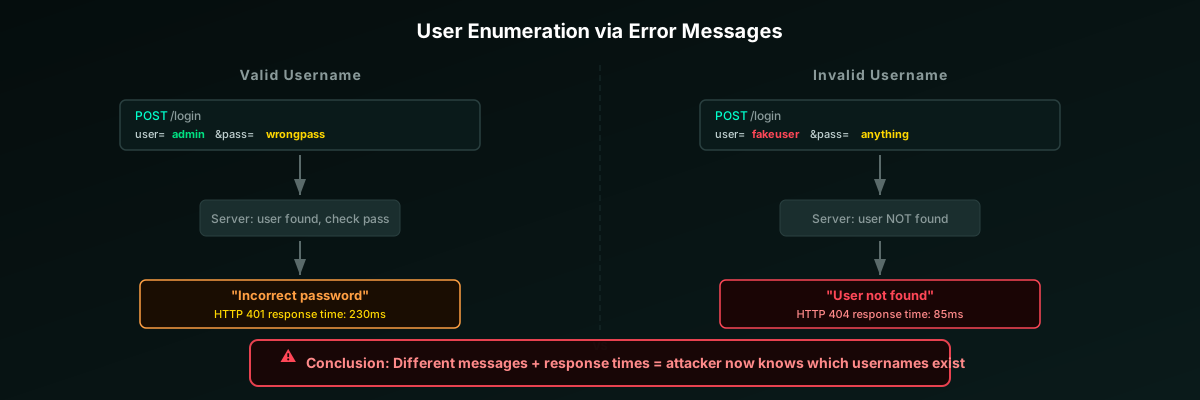
It's not just the message text. Response times leak information too. A login that takes 230ms for valid users (because it's hashing and comparing) but returns in 85ms for invalid users (because it short-circuits) is just as revealing. Even the HTTP status code can differ. 401 vs 404, for instance.
Defense: Return the same generic message regardless. Make sure timing is constant:
// Secure: Generic error response for ALL login failures
async function handleLogin(username, password) {
  const user = await db.findUser(username);

  // Always hash, even if user doesn't exist.
  // Prevents timing-based enumeration.
  const dummyHash = "$2b$12$LJ3m4ys3Lg2UqMk0Bz5r8e";
  const hashToCompare = user?.passwordHash || dummyHash;
  const isValid = await bcrypt.compare(password, hashToCompare);

  if (!user || !isValid) {
    return res.status(401).json({
      error: "Invalid username or password"
    });
  }
  // ... proceed with authenticated session
}
3. Credential Stuffing
Brute force is old news. Credential stuffing is the modern version, and it's far more dangerous.
Attackers take known email/password pairs from previous breaches and replay them against your login. People reuse passwords everywhere, so even hit rates well below 1% compromise thousands of accounts at scale.
The tooling has caught up too. Modern stuffing tools rotate through residential proxies, randomize headers and timing, and solve CAPTCHAs via third-party services. Each request looks like a legitimate user from a different city.
Defense: Rate limiting alone won't cut it. Layer it with breached-password detection (check against known breach sets on registration and login), MFA, and anomaly detection for login patterns. For reference, SecLists Password Collections catalogs the same wordlists attackers use.
4. Authentication Logic Flaws
These are the ones that keep security teams up at night, because no scanner finds them. You have to actually think about the authentication flow.
Multi-step login processes are especially vulnerable. Consider a flow like: Step 1 (enter credentials) -> Step 2 (enter OTP) -> Dashboard. Does the server enforce that step 2 actually happened before granting access?
In the pentest I mentioned up top, it didn't. The server issued a partial session token after step 1, and the dashboard only checked whether a token existed, not whether it had been fully authenticated through all steps.
Other logic flaws we've hit in production:
- Parameter manipulation: Changing a
role=usercookie torole=adminafter authentication - Response tampering: Intercepting
{"authenticated": false}and flipping it totrue(works when the client trusts the response without server-side checks) - Step skipping: Directly requesting
/api/dashboardafter step 1, bypassing MFA entirely
Defense: Enforce authentication state on the server. Every protected endpoint validates the complete authentication chain, not just the presence of a token. Use a state machine pattern for multi-step flows.
Vectors 5-8: The Quick Reference
You get the pattern by now. Here are four more vectors we regularly exploit during assessments:
| # | Vector | How It Works | Defense |
|---|---|---|---|
| 5 | Password Reset Poisoning | Attacker modifies the HTTP Host header on a reset request. Victim gets a legit-looking email with a reset link pointing to the attacker's domain. Token stolen. | Hardcode the reset URL origin. Never derive it from request headers. Use crypto-random tokens, hash before storage, enforce single-use + 15-min expiry. |
| 6 | Missing Rate Limiting | No throttle on the login endpoint means brute force is viable. A 6-digit OTP has only 1M combinations. At 1,000 req/s, that's under 20 minutes. | Progressive rate limiting (IP + account level). CAPTCHA after 3 failures. Temporary lockout after threshold. Monitor for distributed attacks. |
| 7 | Session Fixation | Attacker gets a session ID from the site, tricks the victim into using it, victim logs in, attacker now has an authenticated session. Works when session IDs aren't regenerated on login. | Regenerate session ID immediately after successful auth. Set HttpOnly, Secure, SameSite=Strict on all session cookies. |
| 8 | OAuth/SSO Misconfiguration | Lax redirect_uri validation sends auth codes to attacker domains. Missing state parameter enables CSRF against the OAuth flow. Token leakage via Referer headers. | Exact string matching on redirect_uri. Always enforce state. Use authorization code flow + PKCE. Set Referrer-Policy: no-referrer on callbacks. |
Authentication Hardening Checklist
- Generic error messages everywhere. Never confirm whether a username exists. Normalize response timing too.
- Rate limit all auth endpoints. IP-level and account-level. CAPTCHA after 3 failures, lockout after a threshold.
- Enforce MFA. TOTP or WebAuthn preferred over SMS. No exceptions for admin accounts.
- Validate the full auth chain server-side. Every protected endpoint checks complete authentication state, not just token presence.
- Secure your password reset flow. Hardcoded URL origin, crypto-random tokens, hashed storage, single-use
- Regenerate session IDs on login. And set HttpOnly, Secure, SameSite=Strict on session cookies.
- Check passwords against breach databases. On registration and on every password change. If it's been leaked, reject it.
- Log everything, alert on anomalies. All auth events to your SIEM. Failed attempts, lockouts, successful logins from unusual locations.
Build the Muscle
Authentication security isn't a feature you ship once. It's a practice. Every bypass in this article exploits a gap between what developers assumed was checked and what actually was.
The best defense teams we work with treat login flows like attack surfaces, because they are. They threat-model their auth flows. They write integration tests that specifically try to skip steps, replay tokens, and abuse edge cases. They review their OAuth config as part of every release.
Run through the checklist against your own systems. Better you find these issues than someone with less friendly intentions.
Stay sharp. Stay curious. And rotate those session IDs.
End of Article
Continue Reading
 8 min read
ssrfweb application security+3
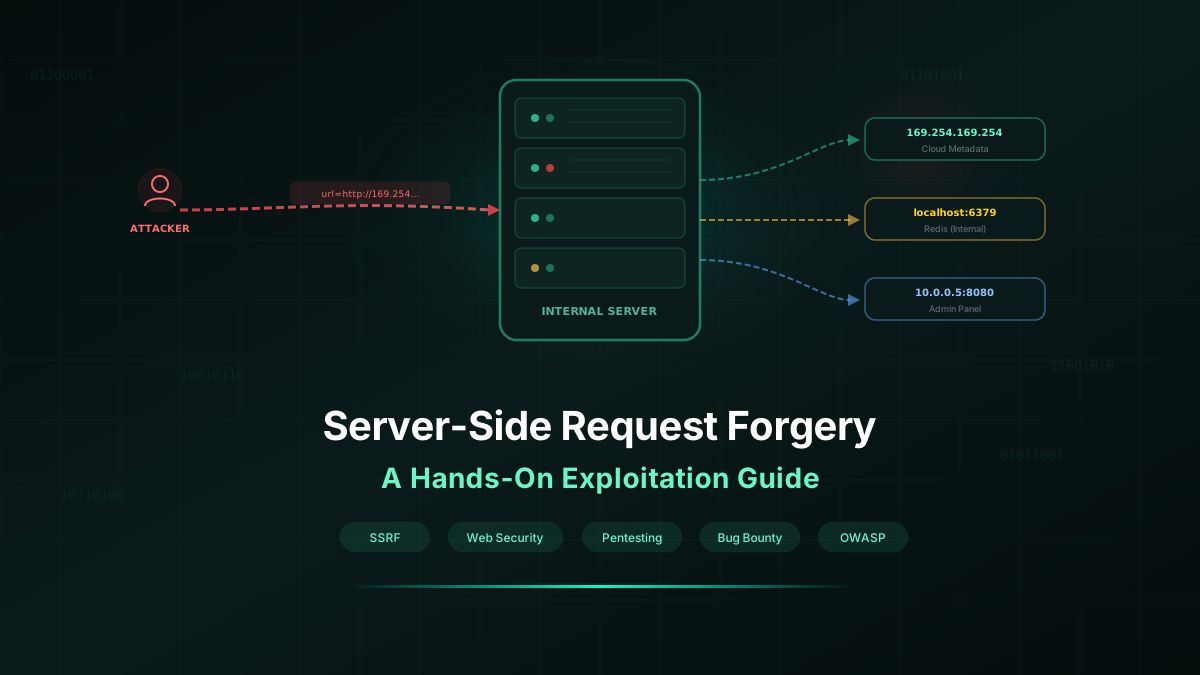
Server-Side Request Forgery (SSRF): A Hands-On Exploitation Guide
A practical, step-by-step walkthrough of SSRF — from finding vulnerable endpoints to exploiting cloud metadata, bypassing filters, and chaining SSRF to full compromise.
Security Research Team·2026-03-07
 8 min read
bug bountyethical hacking training+3
Beginner Guide to Bug Bounty: Find Your First Vulnerability in 7 Days
A realistic 7-day roadmap to finding your first web vulnerability in a bug bounty program, covering tools, methodology, and the mindset that gets results.
Security Research Team·2026-02-16
 8 min read
artificial intelligencepenetration testing+3
Can AI Replace Penetration Testers? A Reality Check
Separating hype from reality. What AI can and cannot do in penetration testing, and why the human pentester is not going anywhere.
Security Research Team·2026-03-03