incident responsecyber attackthreat detectionsecurity monitoringbreach response
What Happens in the First 60 Seconds After You Get Hacked
Security Research Team··10 min read
It Doesn't Look Like the Movies
Hollywood gets hacking wrong in every way that matters. There's no green text raining down a black screen. No dramatic countdown timer. No hacker in a hoodie furiously typing while someone yells "we're in."
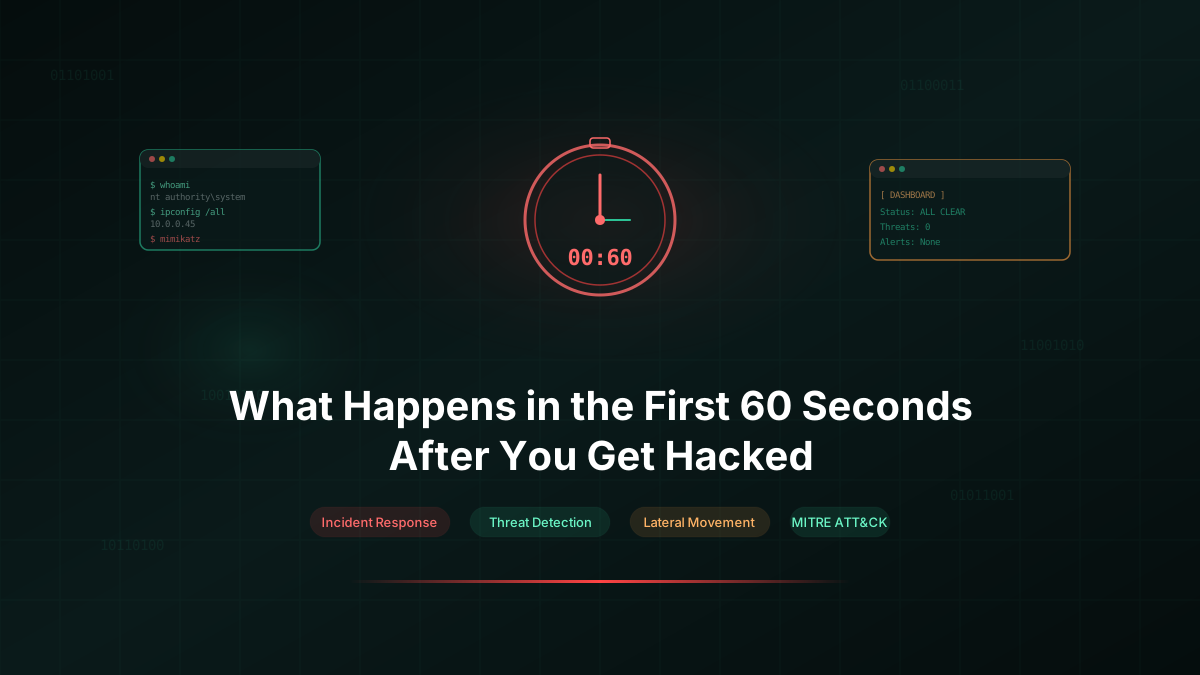
In reality, when an attacker gets initial access to your system, nothing visible happens. No alerts fire. No screens flicker. The server keeps serving pages. The dashboard stays green. Your monitoring tools report all clear.
That silence is the most dangerous part.
We've run hundreds of offensive engagements over the years. The pattern is remarkably consistent. From the moment of initial access to the point where the attacker has a stable foothold, the clock runs about 60 seconds. Sometimes less.
Here's what those 60 seconds actually look like.
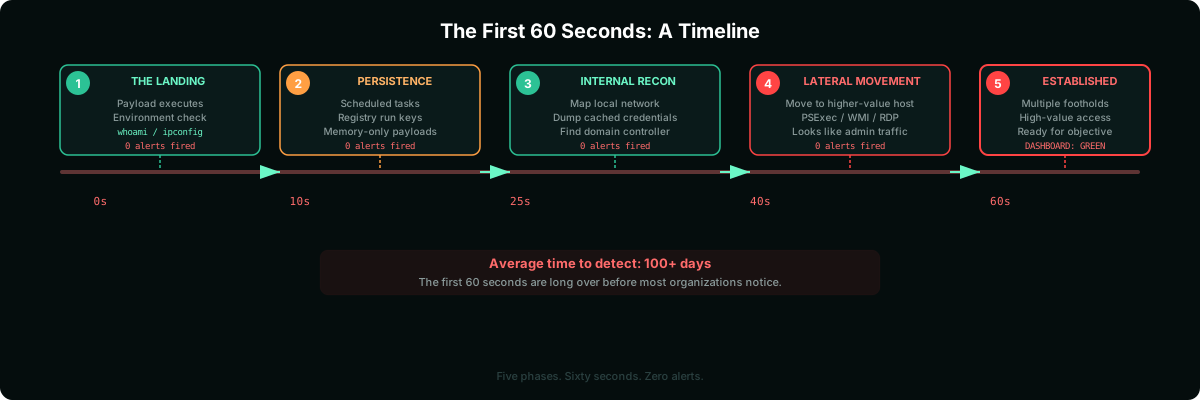
Seconds 0 to 10: The Landing
The attacker is in. Maybe through a phishing link that dropped a payload. Maybe through a vulnerable web application. Maybe through a stolen credential from a previous breach. The method varies. What comes next doesn't.
The first thing that happens is environment check. The payload phones home, confirms execution, and starts gathering basic information about where it landed. Operating system. Username. Domain membership. Network interfaces. Running processes.
This takes about three seconds.
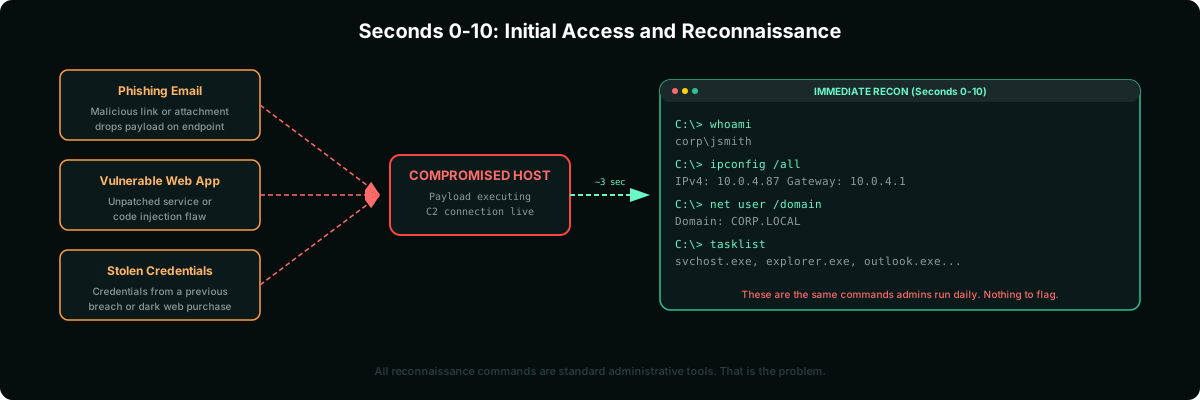
None of these actions trigger standard antivirus. The commands being run are the same ones a system administrator uses daily. whoami. ipconfig. tasklist. There's nothing inherently malicious about asking the operating system what user you are.
That's the problem. The reconnaissance phase looks identical to normal administrative activity.
Seconds 10 to 25: Establishing Persistence
The attacker now knows where they are. The next priority is making sure they stay. If the initial access gets cut off, if the user reboots, if the phishing email gets flagged, they need a backup way back in.
Persistence mechanisms get installed within seconds. A scheduled task. A registry run key. A new service. A modified startup script. Some attackers drop a secondary payload to a different location on disk as a fallback.
The more sophisticated operators skip the disk entirely. They load their tools directly into memory, attach to a legitimate running process, and leave zero files behind. Nothing to scan. Nothing to quarantine.
At this point, the attacker has been in your environment for about 20 seconds. They have a stable connection home and a backup plan if it breaks. No alert has fired.
Seconds 25 to 40: Looking Around
With a foothold secured, the attacker starts mapping the environment. Not the whole network. Not yet. Just the immediate neighborhood.
What's on this machine? What shares are accessible? What credentials are cached in memory? Are there other machines on the same subnet? Is this machine domain-joined? What's the domain controller's IP?
This is where tools like credential dumpers come into play. Cached credentials on a Windows machine can be extracted from memory in under five seconds. If the compromised user has ever logged into this machine, their password hash is likely sitting there.
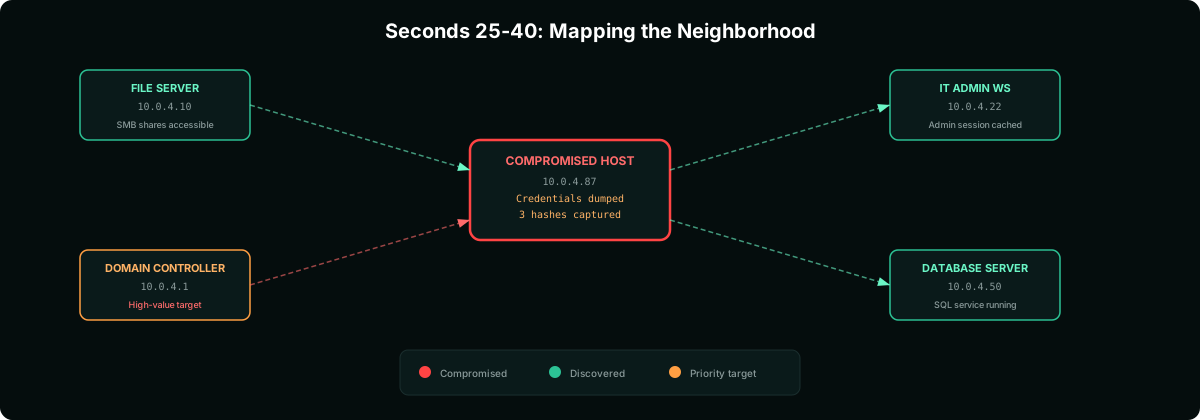
One hash often leads to another machine. And another. And another. This is how a single compromised workstation becomes a pathway to the domain controller. Not through some advanced exploit. Through credential reuse and network trust relationships that were designed for convenience.
Seconds 40 to 60: The First Lateral Move
The attacker has credentials. They know where other machines are. The next step is moving to one of them.
Lateral movement usually targets whatever offers the most value with the least noise. A file server with broad access. A machine where an IT admin is logged in. A jump box that connects to a more sensitive network segment.
The move itself looks mundane. A legitimate remote management protocol, PSExec, WMI, RDP, PowerShell Remoting. These are the same tools your IT team uses to manage servers every day. The traffic patterns are nearly identical.
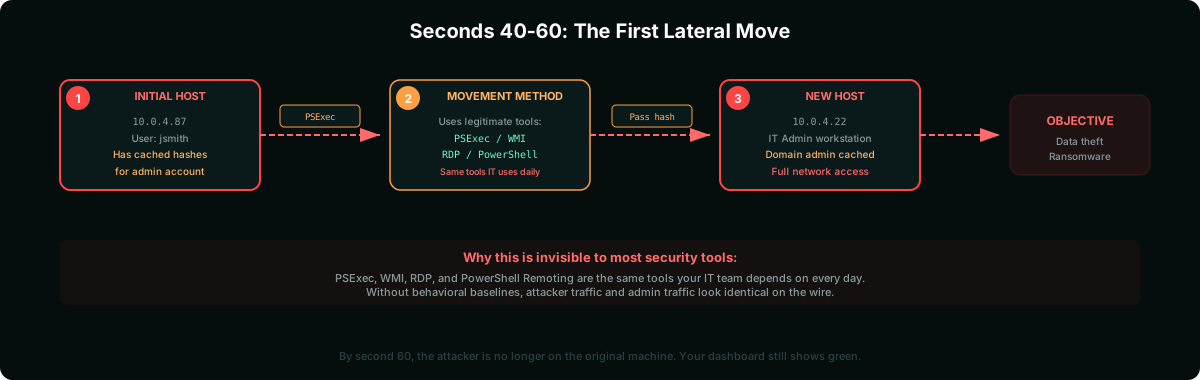
By the 60-second mark, the attacker is no longer on the machine they originally compromised. They've moved to something more interesting. They have multiple ways back in. They know the lay of the land.
And your security dashboard still shows green.
After the First Minute
The first 60 seconds are about survival and positioning. What comes next depends on the attacker's goal.
Data theft: The attacker identifies where sensitive data lives, stages it for extraction, and moves it out through encrypted channels that blend with normal HTTPS traffic. This can happen within hours of initial access.
Ransomware: The attacker maps every reachable system, deploys encryption tools to as many machines as possible simultaneously, and triggers them at a time chosen for maximum disruption. Usually late Friday night or during a holiday weekend.
Long-term access: Some attackers don't want data or disruption. They want persistent, quiet access to monitor communications, steal intellectual property over months, or position themselves for a future attack. These are the hardest to detect because they actively avoid triggering anything.
Why Most Teams Miss It
If the first 60 seconds are this predictable, why don't security teams catch it?
The tools look normal. Attackers use the same protocols and commands that administrators use. Without behavioral baselines, there's nothing anomalous to flag.
Logs exist but nobody's watching. Most organizations generate millions of log events daily. The three or four events that indicate compromise are buried in noise. Without correlation rules tuned to detect lateral movement patterns, they're invisible.
Alerts are tuned too loose. Teams that do have detection often set thresholds high enough to avoid false positives. An attacker who runs whoami once doesn't trigger an alert designed to catch 50 failed login attempts.
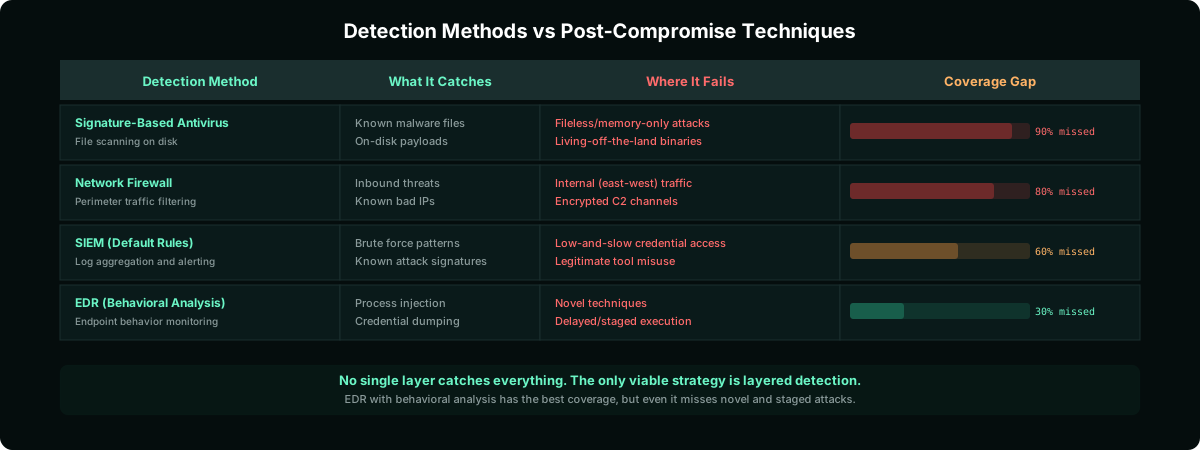
Endpoint detection has blind spots. Memory-only payloads, living-off-the-land techniques, and fileless malware bypass traditional signature-based detection. If your security stack relies primarily on scanning files on disk, you're missing the attacks that matter most.
What You Can Actually Do
The goal isn't to prevent every initial compromise. That's unrealistic. The goal is to detect and respond before the attacker achieves their objective.
Deploy endpoint detection and response (EDR) with behavioral analysis, not just signature scanning.
Monitor for credential access events. If a process reads LSASS memory, that should trigger an immediate alert.
Baseline normal administrative tool usage. Know which accounts use PSExec, WMI, and PowerShell Remoting, and alert when others do.
Implement network segmentation. Lateral movement is only possible when everything can talk to everything else.
Enable and monitor PowerShell script block logging. Most post-exploitation tooling runs through PowerShell.
Reduce credential caching. Limit the number of cached logon sessions on workstations to reduce what an attacker can harvest.
Run regular breach simulations. Test your detection against the exact techniques described in this article. If your SOC doesn't catch a simulated lateral movement, you have a gap.
Measure time to detect, not just whether you detect. An alert that fires three days after the attack is barely better than no alert at all.
The Real Takeaway
Sixty seconds is not a lot of time. But it's enough for a skilled attacker to go from "just got in" to "established, persistent, and moving through your network."
The organizations that survive breaches are not the ones that prevent every initial compromise. They're the ones that notice fast and respond faster. When your detection can shrink that 100-day gap down to minutes or hours, the attacker's playbook starts falling apart.
Start with the basics. Know what normal looks like on your network. Alert on the things that shouldn't happen. And test your detection regularly, because an untested alert is the same as no alert.
End of Article